Day 3 was implementation of the teacher's understanding of learning styles and content area sessions.
The day started with an exercise to drive home the point on how learning styles effect task completion and team work. It was an eye opener, and I won't share too much since I know you could learn more from participating in the workshop. If you'd like to know more be sure to apply to be a Master Teacher in February when the application process begins again!
TO DO: I will post links for assessing student's learning styles tomorrow after I get my papers together.
The second half of the day was spent in content areas such as Science, Language Arts, Social Studies, et al. In Science, the Oklahoma Science Museum (think Omniplex) shared the many different programs available and sampled a couple of demonstrations with us.
It was really pretty cool, and so fun to dust off that skill set and get nerdy with ma' peeps. However, my neice was not at all happy when I rushed back to her after the class and was rubbing a large green balloon against her head and shoving a cup wrapped in Reynolds Wrap in her hands. She translated "complete the circuit" to "getting shocked" and was not as enthusiastic as I was to experience it all. Her spirit of inquiry is really lost when it's time for a Big Mac Attack.
More tomorrow!
Wednesday, August 4, 2010

Tuesday, August 3, 2010
Day 2: Master Teacher Summer Conference
So Tuesday felt like a long day. The speaker, Rich Cash, titled the presentation "Differentiated Instruction: Quality Teaching and Learning Strategies to Maximize the Learning of ALL Students." The wikipedia definition of Differentiated Learning is...
Two Words for Implementation of Differentiated Learning:
Perhaps this is oversimplification, but that's my day in a nutshell. I just saved you eight hours of your life, now log off and go outside! Read a book, email me a cool link to share with other teachers.
Differentiated instruction (sometimes referred to as differentiated learning) involves providing students with different avenues to acquiring content; to processing, constructing, or making sense of ideas; and to developing teaching materials so that all students within a classroom can learn effectively, regardless of differences in ability.[1]
I would have to say, 70 percent of the time was spent establishing a need for the training, explaining basic brain functioning or the differences between the sexes. Many observations focussed on how boys learn differently. Thirty percent of the time was spent reviewing tips that boil down to three simple words: Know Your Students. Suggestions where provided, four pages of bulleted lists or tables covered concrete, take-it-to-class information although they were somewhat vague. It is always good to start the school year with a reminder of what I need to do, just wish I had more concrete things, actionable items, from today.Two Words for Implementation of Differentiated Learning:
Start Small.
Three Words of Resonance that Were Ah Hah's for many:
Praise the Effort
(Not the inteliigence) of the Student.
OK, well that is more than three words but you get the idea.
OK, well that is more than three words but you get the idea.
Perhaps this is oversimplification, but that's my day in a nutshell. I just saved you eight hours of your life, now log off and go outside! Read a book, email me a cool link to share with other teachers.
Monday, August 2, 2010
Day 1: MT Summer Conference

The greatest thing about the first day of being back at the Summer Master Teacher Conference is the unveiling of the book we can offer to our peers in Professional Development. This year's books supplied by the SDE are
Curriculum 21, edited by Heidi Hayes Jacobs and Fulfilling the Promise of the Differentiated Classroom, by Carole Ann Tomlinson.
Although I do not have to use these books, I certainly am interested in previewing them before making a decision. My potential participants have lobbied me on what they feel they would like to see in PD. I have been requested to focus on my technology skills to share with the school, specifically educational Video Production tools for teachers and use of SmartBoards.
From what I have read about the books, I am concerned that the Jacob's book might be redundant, since she is a real mover and shaker in the Curriculum Mapping arena-which has been done a bit overmuch. The reviews on Amazon were somewhat mixed and vague.
Looking forward to tomorrow!
Wednesday, June 16, 2010
2010: PASS Oddysey "Ten Basic Tools for SmartNotebook" Eleven, actually.
Yesterday I presented on SmartBoards, and I hadn't worked on a smartboard for about a month, with testing, finals, grades, and the two weeks of camping (not even Internet, people!) immediately after school let out. First, let me thank everyone who attended the conference yesterday. I hope you are sharing and improving upon what we shared with you! I am happy to have feedback to improve what I use and share with others, so feel free to send me more things you have found useful in your teaching, or would like me to post on my blog.
Lesson Plans and Resources for your SmartBoard
(or IWB, Interactive White Board if you have a Mead or NEC, or Promethian or WiiBoard)
Trying to find Smart Presentations to utilize the tools we are beginning to get in the classroom is a very important topic to cover when talking about IWBs. The time went by so quickly at the conference yesterday that I did not spend nearly enough time introducing this web resource. If you are struggling to make your class a Smarter class, this is a searchable database and can be sorted by grade, subject, et cetera. I have found excellent resources that I have then adapted using what I learned about unlocking locked items, and then customizing them when needed.
The 10 Simple Ways to Add Interactivity by Colleen Schafer
1. Move to Reveal
2. Erase to Reveal
3. Change Color to Reveal
7. Identify and Label allows the user create labels for graphics on the smartboard.
Lesson Plans and Resources for your SmartBoard
(or IWB, Interactive White Board if you have a Mead or NEC, or Promethian or WiiBoard)
Trying to find Smart Presentations to utilize the tools we are beginning to get in the classroom is a very important topic to cover when talking about IWBs. The time went by so quickly at the conference yesterday that I did not spend nearly enough time introducing this web resource. If you are struggling to make your class a Smarter class, this is a searchable database and can be sorted by grade, subject, et cetera. I have found excellent resources that I have then adapted using what I learned about unlocking locked items, and then customizing them when needed.
The 10 Simple Ways to Add Interactivity by Colleen Schafer
1. Move to Reveal
Create a text box with the info to be revealed, then place a graphic from the gallery or your own graphic library over the text. SmartNotebook layers the items automatically. I recommend you lock the answer beneath so it does not accidentally get moved.
Type the answer or message you'd like to reveal, then cover up with a pen tool with a matching color to the background. To reveal the answer, pick up the eraser and wipe away the pen markings.
3. Change Color to Reveal
Type the text you want to hide, change the background color to the same color as the text. Then, as you are presenting, right click on the background and change the Properties/Color to a contratsting color of the text items you wish to reveal.
4. Order of Objects
The Order of Objects refers to what is layered on your page back to front. The oldest thing on the page is by default the bottom layer, think your background. You can change this order by moving things forward or back. To use this as an interactive tool--First, type your text on the page. Second, create an object in a different color that you will use to reveal (like the rectangle, grouped with an arrow in the example).5. Spotlight Tool select the Magic Pen from the SmartNotebook toolbar (bottom or top, pen with the stars around it). Draw a circle with the tool and it will become the Spotlight Tool, greying out the screen all over, but leaving one round section highlighted. (No Video Clip)The Magic Pen is a three-in-one tool to spotlight, magnify or zoom in on an image, or write notes that will disappear in 10 seconds. Draw a square to magnify an object or draw a circle to add a spotlight. Here's SmartTech's demo, I could not do it justice...
Magic Pen Demo
Magic Pen Demo
6. Table Tool inserts a table, very similar to the Insert Table button in MS Word. You can drag graphics and words into the table, hand as a graphic organizer.
Table Tool Demo by SmartTech
Table Tool Demo by SmartTech
7. Identify and Label allows the user create labels for graphics on the smartboard.
8. Infinite Cloner is on the drop down menu of any object on the page. If you select infinite cloner, when the item is clicked on it creates an duplicate of the object that may then be dragged and dropped.
9. Pull Tabs are found in the Gallery, and can then be grouped with text or objects. Mark the target for the tab to be pulled to for accurate placement, over the other objects on the page. Grouping items is key for this to work, so use a select box or your mouse and the CTRL button to select multiple items, them CTRL G to group them together for easy movement.
10. Dual Page Display is a button on the SmartNotebook 10 Toolbar, next to the Elmo button. Displays two pages side by side.
2010: PASS Oddysey "From Overstimulated to Engaged"
FROM OVER STIMULATED TO ENGAGED!
by alyssa henley ahenley@lawtonps.org
presented by trina menzie tmenzie@lawtonps.org
Topics Covered in this Post:
Videos, Virtual Labs/Simulations, Vocabulary and Fact Building through Mnemonics.
**Most of this presentation is for the SCIENCE classroom; however, they are all interdisciplinary/ cross curricular activities! Add measurement, charts, and tables to incoorporate math, making them fill out a lab report or summarize their findings is a reading PASS objective, use correct English/ grammar in their writing is meeting English PASS objectives, many science concepts are Geography PASS objectives. Many of our projects incorporate Art and Music into the classroom as well!
INTRO:
TECHNOLOGY WORKS!
**If you are not able to make clips like my movies below, just borrow them! Youtube is full of educational presentations and clips to show in class, you just have to think outside the box!
Example for reading: Talking in 3rd person: There is a "Seinfeld" Clip of Elaine dating a guy who only talks in 3rd person. That would be a fun clip to show before you discuss it in class. You could really set it up by entering the class and talking that way yourself... then showing the video... Then have small groups discuss questions... 1. Why was Jimmy talking like that? 2. How did people react to the way he spoke? 3. Would it ever benefit the situation/ or be okay to talk like that? A co-worker of mine sent her students to me all with the promise that they would talk in 3rd person to me. It would have been easy to catch if they had been playing around. But all of them answered my questions seriously and interested in the topic, but in 3rd person... no giggles, very serious.... it took me a while to catch on to what they were doing and it was fun for all of us!
My examples are science below, but if you think about your main concepts and start looking for them in everyday TV, you will notice there are a ton of cartoon and movie clips you can show to reinforce PASS concepts! If you use the clip below, you might want to stop it before it ends. There is one inappropriate reference at the end (for school)....but the point is to go to youtube and search for key words.... there are tons of lessons out there already made or clips (like below) that people have already found.
DISCUSSIONS FROM TV, MOVIE CLIPS
Problems: Showing mythbusters takes up an entire hour and there is no time for discussions, or active learning. Why not take the parts from Mythbusters that are needed, and add slides to pause them for discussions. The kids are interested in the clip and they relate to it. Other easy examples to get the scientific method clips from: Mythbusters, Bill Nye, Scooby Doo! There is nothing more fun than when Fred tells the gang... "Okay Scooby you go here, Daphne and I will be here...when the ghost comes in.... (blah blah blah), ...and we will have caught him!" Then your job as the teacher is to say... okay write down the vocabulary word for this on your white boards... your small groups have 4 minutes to discuss possible answers.... They love it....I will tell you how to make the mini movies later!
(show movie through 1 or 2 blue slides to show point) then go back to presentation.
LESSON PLAN TO TEACH WAVE DIFFRACTION, USING ACE VENTURA. To save time: The first slide that challenges their thinking is at 1 min and 48 sec. Then they review the glass door scene. At 2 min and 10 seconds the lesson begins. The teacher can pause the screen for as long as they want to discuss, pair kids up in groups to try and answer the question, or have students reflect about the question on their own.
LESSON PLAN TO REINFORCE SIMPLE MACHINES AND ENERGY USING TOM AND JERRY
LESSON PLAN TO REINFORCE SCIENTIFIC METHOD THROUGH MYTHBUSTERS
LESSON PLAN TO REINFORCE RATE THROUGH HARRY POTTER** there is a minor mistake on this one that i will correct this summer
.
LESSON PLAN TO REINFORCE CONSERVATION OF MASS THROUGH HARRY POTTER
ONLINE SIMULATIONS , GAMES AND VIRTUAL LABS!
GIZMOS @ www.explorelearning.com
Cannot recommend enough! Try a 30 day free account. (during the school year so you can use it with your students) Teachers are given many possible simulations organized by subject (math/science) and PASS OBJECTIVES at GRADE LEVEL! (there are also reading and geography pass objectives being met as well in many of them.) Grades 3-12. Example: On the website I can look up 7th grade science process skill: Measurement and there are 5 online virtual labs/ simulations that I can use.
Here is a run through of 1 lesson plan. (mass vs. weight) It guides students through inquiry to determine FOR THEMSELVES that mass and weight are different.
Sorry-still working on this, see here to scroll down to the Slide.com sample would not embed properly. See Henley's original document at http://oklahomageology.pbworks.com/Overstimulated-2-Engaged
Benefits of explore learning gizmos
1. Can be done together as a class if you have a projector or smart board. A smart board is ideal because students can take turns coming up and actively participating.
2. Very effective in small groups of 2 or 3 to allow discussions (computer lab or laptops)
3. Can be done individually in a computer lab/ or laptop computers (however, it is best if computers are somewhat new so they can handle the software)
4. Each "gizmo" gives teachers a packet of info including a Teacher Guide. This Teacher Guide often has pre lab activities and how to lead up to the gizmo. I have gotten some really great ideas from these sections!
5. Each gizmo gives teachers a vocabulary list with definitions
6. Each gizmo gives teachers a Student Exploration Lab to print off for students (so the lesson is already done!)
7. Each gizmo gives teachers an Answer Key for teh Student Exploration Guide.
8. There are usually 5 Assessment Questions below the Gizmo that can be copied and pasted as an authentic quiz or test questions to be used later to assess learning.
9. The kids are exploring on their own in a self-paced, differentiated lesson.
10. You are incorporating technology into your class!!!
11. It allows students to manipulate an environment that they could not really have access to, or your school may not have funds to purchase materials for.
12. Organized by state standards for math and science.
Drawbacks of gizmos:
1. If you do not have computers or an overhead projector, it would be hard to use.
2. 1 teacher is $800.00 a year. I wrote a grant to cover my expense and am currently talking to funded areas in my school about getting a long term subscription, ex. Title I, Title II funds, Science Department funds,...etc.
Examples of gizmos:
***Go to www.explorelearning.com and find the search bar. Type in any concept! You will find many "gizmos" to look at.
***Weight vs. Mass gizmo--allows students to use a spring scale and balance to find weight and mass. Then allows students to change where objects are measured.... on Earth, the moon, jupiter? They find that mass does not change and weight does. The activity not only brings them to this conclusion, but helps them to discover it for themselves which ends up meaning more!
***Several food chain gizmos. You can tell your students that if you deplete the primary consumers that the secondary consumers will be affected and die off, but let them DO it! In this gizmo the guide allows them to manipulate variables and learn the connections and interdependence of biotic factors in the food chains.
***Mineral identification lab. Not all of us have streak plates, acid, and all the materials needed to perform mineral analysis. This gizmo gives them the materials they need! My students were amazed with this lab of identifying minerals. It was a huge win for my class this year.
REMEMBER: The student guides tell you what you should be doing. So always print that out first!
RELATE TO THEM!
Charts and graphs worksheets? Don't use the ones that come with the textbook. Make your own by cutting and pasting current tables and charts off the internet.
Baseball/ Football stats of the current season
Nascar
Popular show ratings off of a certain channel (Disney, Nick)
Popular music ratings
Or poll the class on questions: Favorite sport, music, tv show, etc.
Have them find the answers to basic questions in the tables, and convert the data into graphs.
ONLINE SIMULATIONS AND RESOURCES @ www.bloust.com/henley (400 resources catagorized by scientific content!) Just open up the page, go to "mylinks", then click content area. There is also an option for Teacher Resources. You wouldn't believe some of the things I've found out there for teachers! Its amazing!
www.google.com
Google is your best friend. You have an idea? It is highly likely that someone has thought of it before. Google for it, or go to popular but fun lesson plan sites such as
http://www.sciencespot.net/Pages/classroom.html -- she only posts the best, most interactive activities such as Microscope Mania!
VOCABULARY / FACT BUILDERS
Simon Says
Taboo--create your own taboo cards and follow the rules for the game. The top word should be a vocabulary word, and the bulleted words underneath it should be words from the book definition. This helps students not depend on the book definition, but think outside the box. They are frustrated the first time you play b/c it is not easy! It is a challenge; however, they really enjoy it!
Bingo (google for "create free bingo cards") ask definitions, they box out the vocabulary terms.
Pictionary. Similar to Taboo, but students have to be able to draw the vocabulary word without gestures or words.
jeopardy, millionaire, and other game show powerpoint templates--google for templates to use to review concepts or try these. Kids really get into it!
http://people.uncw.edu/ertzbergerj/ppt_games.html
http://jc-schools.net/tutorials/ppt-games/
Mnemonic / Kinesthetic Activities
Simon Says--already shown above, but if they can memorize the pose for the word, then they can infer easily what that word means.
Mitosis Handsignals--the handsignals give insight into what is happening in each stage
States of Matter hand signals
solid--thumbs interlocked, two fists vibrating against eachother; demonstrates strong bond and that atoms are actually moving.
liquid--tips of thumbs now touch, move two fists around making sure to keep thumbs touching; demonstrates a weaker bond, that a liquid will
take the shape of its container.
gas-- two fists move around randomly; demonstrates bond is broken, gas will take the shape of its container.
We also relate energy to these hand signals such as (the addition of heat to a substance)
3 heat transfer hand signals
Cell #5 song--You will love it. (you will have to click the link to it) or this one of my class.
Kingdom Phylum Song--sung to "Are you sleeping"
Kingdom , Phylum (Kingdom, Phylum)
Class, Order (Class, Order)
Family, Genus, Species (Family Genus Species)
Domain is first, (Domain is first)
Repeat (and can sing in "rounds" when they know it really well)
Rock Cycle Song--sung to Row Row Row your boat.
Sedimentary rock has been formed in layers
often found near water sources with fossils from decayers.
Then theres igneous rock, here since earth was born
Molton lava, cooled and hardened, thats how it is formed
These two types of rock can also be transformed
With pressure, heat and chemicals, Metamorphic they'll become.
(simple) Water Cycle Song--sing to "She'll be coming around the mountain"
Oh the water goes in a cycle yes it does (yes it does)
Oh the water goes in a cycle yes it does (yes it does)
It goes up as evaporation (hands up)
Comes together in condensation (hands clap together over head)
Falls back down as precipitation , yes it does (yes it does!)
Many teachers post songs they made up for their classrooms to youtube. Some student project songs that kids created and posted to you tube are amazing! There is a song to "Poker Face" that has all the bones of the body, A very funny "noun" song some high school kids made up, and all the bill nye songs are on youtube as short clips.
Here are more http://www.songsforteaching.com/biologysongs/
http://www.africangreyparrott.com/teach.html
LABS DO WORK, ESPECIALLY WITH DISCUSSIONS AFTERWARDS!
Have trouble getting kids to write good "Procedures" as part of the scientific method? The Peanut Butter and Jelly Lab is perfect for this! You tell the kids to write a procedure for how to make a PB&J sandwich. Then, no matter what they say, you flip it and misinterpret it. Lesson is that their sentences work best if they are short and consise. You will be amazed with how hard it is for them to give a simple, and clear instruction. Reading teachers, this can be used when teaching "Writing in 2nd person".
Teach hands on! Plate tectonics labs
#1--cut up magazines and have them determine boundaries... Which boundaries were convergent, divergent or transform? Higher level, ask them what each occurance makes (earthquake, volcanoes, rift valley)
#2--create your own pangaea blocks. It demonstrates that scientists use CLUES such as geological morphology, fossil evidence, rock findings (and not the shape of continents) to determine how Pangaea fit together!
#3--Graham cracker lab!--there is no more fun than this lab (google it for examples of this lab) ! The kids will love you and talk about it forever. Use it as a reward for 2 weeks of good behavior, etc. After this lab, students are able to relate their hands on experience to plate boundaries.
Relate worksheets to them! Its amazing how much more interested students are when the topic is of interest. I've given out the Genetics Worksheet with your typical hybrid guinea pigs .....asking the students to solve what color their baby guinea pig children will be.... They much more enjoy Spongebob Genetics worksheets.... flipping a coin to determine their child's alleles and physical features.....
by alyssa henley ahenley@lawtonps.org
presented by trina menzie tmenzie@lawtonps.org
Topics Covered in this Post:
Videos, Virtual Labs/Simulations, Vocabulary and Fact Building through Mnemonics.
**Most of this presentation is for the SCIENCE classroom; however, they are all interdisciplinary/ cross curricular activities! Add measurement, charts, and tables to incoorporate math, making them fill out a lab report or summarize their findings is a reading PASS objective, use correct English/ grammar in their writing is meeting English PASS objectives, many science concepts are Geography PASS objectives. Many of our projects incorporate Art and Music into the classroom as well!
INTRO:
TECHNOLOGY WORKS!
**If you are not able to make clips like my movies below, just borrow them! Youtube is full of educational presentations and clips to show in class, you just have to think outside the box!
Example for reading: Talking in 3rd person: There is a "Seinfeld" Clip of Elaine dating a guy who only talks in 3rd person. That would be a fun clip to show before you discuss it in class. You could really set it up by entering the class and talking that way yourself... then showing the video... Then have small groups discuss questions... 1. Why was Jimmy talking like that? 2. How did people react to the way he spoke? 3. Would it ever benefit the situation/ or be okay to talk like that? A co-worker of mine sent her students to me all with the promise that they would talk in 3rd person to me. It would have been easy to catch if they had been playing around. But all of them answered my questions seriously and interested in the topic, but in 3rd person... no giggles, very serious.... it took me a while to catch on to what they were doing and it was fun for all of us!
My examples are science below, but if you think about your main concepts and start looking for them in everyday TV, you will notice there are a ton of cartoon and movie clips you can show to reinforce PASS concepts! If you use the clip below, you might want to stop it before it ends. There is one inappropriate reference at the end (for school)....but the point is to go to youtube and search for key words.... there are tons of lessons out there already made or clips (like below) that people have already found.
DISCUSSIONS FROM TV, MOVIE CLIPS
Problems: Showing mythbusters takes up an entire hour and there is no time for discussions, or active learning. Why not take the parts from Mythbusters that are needed, and add slides to pause them for discussions. The kids are interested in the clip and they relate to it. Other easy examples to get the scientific method clips from: Mythbusters, Bill Nye, Scooby Doo! There is nothing more fun than when Fred tells the gang... "Okay Scooby you go here, Daphne and I will be here...when the ghost comes in.... (blah blah blah), ...and we will have caught him!" Then your job as the teacher is to say... okay write down the vocabulary word for this on your white boards... your small groups have 4 minutes to discuss possible answers.... They love it....I will tell you how to make the mini movies later!
(show movie through 1 or 2 blue slides to show point) then go back to presentation.
LESSON PLAN TO TEACH WAVE DIFFRACTION, USING ACE VENTURA. To save time: The first slide that challenges their thinking is at 1 min and 48 sec. Then they review the glass door scene. At 2 min and 10 seconds the lesson begins. The teacher can pause the screen for as long as they want to discuss, pair kids up in groups to try and answer the question, or have students reflect about the question on their own.
LESSON PLAN TO REINFORCE SIMPLE MACHINES AND ENERGY USING TOM AND JERRY
LESSON PLAN TO REINFORCE SCIENTIFIC METHOD THROUGH MYTHBUSTERS
LESSON PLAN TO REINFORCE RATE THROUGH HARRY POTTER** there is a minor mistake on this one that i will correct this summer
.
LESSON PLAN TO REINFORCE CONSERVATION OF MASS THROUGH HARRY POTTER
How I made these movies
1. Going to youtube to find an example of a clip that I would like to use. Copying the website from the address bar.(Copyright does not apply to clips under 3 minutes to my knowledge)
2. Going to www.zamzar.com to convert the youtube video to a file your computer can support (Windows Media or other) It will email it to you.
3. Creating a powerpoint of slides and saving them (file: save as) jpegs. It saves each slide separately as a picture.
4. Using Microsoft Movie Maker or Mac iMovie and inserting the jpegs in order.
5. Using Microsoft Movie Maker or Mac iMovie and inserting the file (that was sent to your email from zamzar)
Menzie's Note: KickYoutube.com...
Once you find a video on Youtube.com, insert the word kick in front of the word YouTube, and it will redirect you to a website that shows options for downloading the video. To manipulate the file in MovieMaker (which is already installed and paid for on the majority of pc's with Window's operating systems, you just haven't looked for it before!), save the file as a WMV. I will try to add a graphic in a day or two to help you preview the user interface (what the screen looks like)
6. Just use the ones I have created! :) I should add more in the future. Just go to www.bloust.com/henley click "my links" and then click "My Mini Lessons" for a list of the ones I have created and uploaded onto youtube.
ONLINE SIMULATIONS , GAMES AND VIRTUAL LABS!
GIZMOS @ www.explorelearning.com
Cannot recommend enough! Try a 30 day free account. (during the school year so you can use it with your students) Teachers are given many possible simulations organized by subject (math/science) and PASS OBJECTIVES at GRADE LEVEL! (there are also reading and geography pass objectives being met as well in many of them.) Grades 3-12. Example: On the website I can look up 7th grade science process skill: Measurement and there are 5 online virtual labs/ simulations that I can use.
Here is a run through of 1 lesson plan. (mass vs. weight) It guides students through inquiry to determine FOR THEMSELVES that mass and weight are different.
Sorry-still working on this, see here to scroll down to the Slide.com sample would not embed properly. See Henley's original document at http://oklahomageology.pbworks.com/Overstimulated-2-Engaged
<object type="application/x-shockwave-flash" data="http://widget-2a.slide.com/widgets/slideticker.swf" height="320" width="426" style="width:426px;height:320px"><param name="movie" value="http://widget-2a.slide.com/widgets/slideticker.swf" /><param name="quality" value="high" /><param name="scale" value="noscale" /><param name="salign" value="l" /><param name="wmode" value="transparent"/> <param name="flashvars" value="cy=ms&il=1&channel=10303274&site=widget-2a.slide.com"/>object><p style="white-space:nowrap"><a href="http://www.slide.com/pivot?cy=ms&at=un&id=10303274&map=1" target="_blank"><img src="http://widget-2a.slide.com/p1/10303274/ms_t028_v000_s0un_f00/images/xslide1.gif" border="0" ismap="ismap" />a> <a href="http://www.slide.com/pivot?cy=ms&at=un&id=10303274&map=2" target="_blank"><img src="http://widget-2a.slide.com/p2/10303274/ms_t028_v000_s0un_f00/images/xslide2.gif" border="0" ismap="ismap" />a> <a href="http://www.slide.com/pivot?cy=ms&at=un&id=10303274&map=F" target="_blank"><img src="http://widget-2a.slide.com/p4/10303274/ms_t028_v000_s0un_f00/images/xslide42.gif" border="0" ismap="ismap" />a>p>p>p>
Benefits of explore learning gizmos
1. Can be done together as a class if you have a projector or smart board. A smart board is ideal because students can take turns coming up and actively participating.
2. Very effective in small groups of 2 or 3 to allow discussions (computer lab or laptops)
3. Can be done individually in a computer lab/ or laptop computers (however, it is best if computers are somewhat new so they can handle the software)
4. Each "gizmo" gives teachers a packet of info including a Teacher Guide. This Teacher Guide often has pre lab activities and how to lead up to the gizmo. I have gotten some really great ideas from these sections!
5. Each gizmo gives teachers a vocabulary list with definitions
6. Each gizmo gives teachers a Student Exploration Lab to print off for students (so the lesson is already done!)
7. Each gizmo gives teachers an Answer Key for teh Student Exploration Guide.
8. There are usually 5 Assessment Questions below the Gizmo that can be copied and pasted as an authentic quiz or test questions to be used later to assess learning.
9. The kids are exploring on their own in a self-paced, differentiated lesson.
10. You are incorporating technology into your class!!!
11. It allows students to manipulate an environment that they could not really have access to, or your school may not have funds to purchase materials for.
12. Organized by state standards for math and science.
Drawbacks of gizmos:
1. If you do not have computers or an overhead projector, it would be hard to use.
2. 1 teacher is $800.00 a year. I wrote a grant to cover my expense and am currently talking to funded areas in my school about getting a long term subscription, ex. Title I, Title II funds, Science Department funds,...etc.
Examples of gizmos:
***Go to www.explorelearning.com and find the search bar. Type in any concept! You will find many "gizmos" to look at.
***Weight vs. Mass gizmo--allows students to use a spring scale and balance to find weight and mass. Then allows students to change where objects are measured.... on Earth, the moon, jupiter? They find that mass does not change and weight does. The activity not only brings them to this conclusion, but helps them to discover it for themselves which ends up meaning more!
***Several food chain gizmos. You can tell your students that if you deplete the primary consumers that the secondary consumers will be affected and die off, but let them DO it! In this gizmo the guide allows them to manipulate variables and learn the connections and interdependence of biotic factors in the food chains.
***Mineral identification lab. Not all of us have streak plates, acid, and all the materials needed to perform mineral analysis. This gizmo gives them the materials they need! My students were amazed with this lab of identifying minerals. It was a huge win for my class this year.
REMEMBER: The student guides tell you what you should be doing. So always print that out first!
RELATE TO THEM!
Charts and graphs worksheets? Don't use the ones that come with the textbook. Make your own by cutting and pasting current tables and charts off the internet.
Baseball/ Football stats of the current season
Nascar
Popular show ratings off of a certain channel (Disney, Nick)
Popular music ratings
Or poll the class on questions: Favorite sport, music, tv show, etc.
Have them find the answers to basic questions in the tables, and convert the data into graphs.
ONLINE SIMULATIONS AND RESOURCES @ www.bloust.com/henley (400 resources catagorized by scientific content!) Just open up the page, go to "mylinks", then click content area. There is also an option for Teacher Resources. You wouldn't believe some of the things I've found out there for teachers! Its amazing!
www.google.com
Google is your best friend. You have an idea? It is highly likely that someone has thought of it before. Google for it, or go to popular but fun lesson plan sites such as
http://www.sciencespot.net/Pages/classroom.html -- she only posts the best, most interactive activities such as Microscope Mania!
VOCABULARY / FACT BUILDERS
Simon Says
Taboo--create your own taboo cards and follow the rules for the game. The top word should be a vocabulary word, and the bulleted words underneath it should be words from the book definition. This helps students not depend on the book definition, but think outside the box. They are frustrated the first time you play b/c it is not easy! It is a challenge; however, they really enjoy it!
Bingo (google for "create free bingo cards") ask definitions, they box out the vocabulary terms.
Pictionary. Similar to Taboo, but students have to be able to draw the vocabulary word without gestures or words.
jeopardy, millionaire, and other game show powerpoint templates--google for templates to use to review concepts or try these. Kids really get into it!
http://people.uncw.edu/ertzbergerj/ppt_games.html
http://jc-schools.net/tutorials/ppt-games/
Mnemonic / Kinesthetic Activities
Simon Says--already shown above, but if they can memorize the pose for the word, then they can infer easily what that word means.
Mitosis Handsignals--the handsignals give insight into what is happening in each stage
States of Matter hand signals
solid--thumbs interlocked, two fists vibrating against eachother; demonstrates strong bond and that atoms are actually moving.
liquid--tips of thumbs now touch, move two fists around making sure to keep thumbs touching; demonstrates a weaker bond, that a liquid will
take the shape of its container.
gas-- two fists move around randomly; demonstrates bond is broken, gas will take the shape of its container.
We also relate energy to these hand signals such as (the addition of heat to a substance)
3 heat transfer hand signals
Cell #5 song--You will love it. (you will have to click the link to it) or this one of my class.
Kingdom Phylum Song--sung to "Are you sleeping"
Kingdom , Phylum (Kingdom, Phylum)
Class, Order (Class, Order)
Family, Genus, Species (Family Genus Species)
Domain is first, (Domain is first)
Repeat (and can sing in "rounds" when they know it really well)
Rock Cycle Song--sung to Row Row Row your boat.
Sedimentary rock has been formed in layers
often found near water sources with fossils from decayers.
Then theres igneous rock, here since earth was born
Molton lava, cooled and hardened, thats how it is formed
These two types of rock can also be transformed
With pressure, heat and chemicals, Metamorphic they'll become.
(simple) Water Cycle Song--sing to "She'll be coming around the mountain"
Oh the water goes in a cycle yes it does (yes it does)
Oh the water goes in a cycle yes it does (yes it does)
It goes up as evaporation (hands up)
Comes together in condensation (hands clap together over head)
Falls back down as precipitation , yes it does (yes it does!)
Many teachers post songs they made up for their classrooms to youtube. Some student project songs that kids created and posted to you tube are amazing! There is a song to "Poker Face" that has all the bones of the body, A very funny "noun" song some high school kids made up, and all the bill nye songs are on youtube as short clips.
Here are more http://www.songsforteaching.com/biologysongs/
http://www.africangreyparrott.com/teach.html
LABS DO WORK, ESPECIALLY WITH DISCUSSIONS AFTERWARDS!
Have trouble getting kids to write good "Procedures" as part of the scientific method? The Peanut Butter and Jelly Lab is perfect for this! You tell the kids to write a procedure for how to make a PB&J sandwich. Then, no matter what they say, you flip it and misinterpret it. Lesson is that their sentences work best if they are short and consise. You will be amazed with how hard it is for them to give a simple, and clear instruction. Reading teachers, this can be used when teaching "Writing in 2nd person".
Teach hands on! Plate tectonics labs
#1--cut up magazines and have them determine boundaries... Which boundaries were convergent, divergent or transform? Higher level, ask them what each occurance makes (earthquake, volcanoes, rift valley)
#2--create your own pangaea blocks. It demonstrates that scientists use CLUES such as geological morphology, fossil evidence, rock findings (and not the shape of continents) to determine how Pangaea fit together!
#3--Graham cracker lab!--there is no more fun than this lab (google it for examples of this lab) ! The kids will love you and talk about it forever. Use it as a reward for 2 weeks of good behavior, etc. After this lab, students are able to relate their hands on experience to plate boundaries.
Relate worksheets to them! Its amazing how much more interested students are when the topic is of interest. I've given out the Genetics Worksheet with your typical hybrid guinea pigs .....asking the students to solve what color their baby guinea pig children will be.... They much more enjoy Spongebob Genetics worksheets.... flipping a coin to determine their child's alleles and physical features.....
Tuesday, May 4, 2010
Professional Development Opportunities
It's unfortunate that it can be so difficult to have meaningful professional development. The Oklahoma State Department of Education is now offering online participation so we dont even need to drive to OKC...but try getting a day to do it on! Manuel Gonazalez and the other Uber Geeks in the SDE 21st Century Learning Lab in OKC are now WebEx capable and allows you to participate via your own webcam or even just use a chat room if you aren't webcam accessible. No, I have not been able to participate yet...
To find out more about the SDE's professional training opportunities, please check out the Ning at http://osdetraining.ning.com/ for a complete schedule and to share with other professionals.
Free Training online! Here's an email and link for a webinars by SMART Technologies--I cant participate in either one due to scheduling issues. (It's a cut and paste from email, I did not write this)
How Interactive Technology Can Improve Learning Outcomes for Students with Special Needs
Wednesday, May 19, 2010 — 3 p.m. Eastern / 12 p.m. Pacific
Effective use of classroom technology can improve engagement for all students by addressing different learning styles.
Join this expert panel discussion of fellow educators exploring how interactive classroom technology can increase student engagement, reduce barriers for individuals with special needs and enable multiple means of expression.
In this complimentary one-hour webinar, you’ll learn how schools across North America have improved the cognitive, communicative, social and behavioral outcomes of students with autism spectrum disorder. See examples of how easy-to-use classroom technology can enable extraordinary transformations in teaching and learning, and deliver the best return on investment through improved student outcomes.
Register now to learn how to:
To find out more about the SDE's professional training opportunities, please check out the Ning at http://osdetraining.ning.com/ for a complete schedule and to share with other professionals.
Free Training online! Here's an email and link for a webinars by SMART Technologies--I cant participate in either one due to scheduling issues. (It's a cut and paste from email, I did not write this)
How Interactive Technology Can Improve Learning Outcomes for Students with Special Needs
Wednesday, May 19, 2010 — 3 p.m. Eastern / 12 p.m. Pacific
Effective use of classroom technology can improve engagement for all students by addressing different learning styles.
Join this expert panel discussion of fellow educators exploring how interactive classroom technology can increase student engagement, reduce barriers for individuals with special needs and enable multiple means of expression.
In this complimentary one-hour webinar, you’ll learn how schools across North America have improved the cognitive, communicative, social and behavioral outcomes of students with autism spectrum disorder. See examples of how easy-to-use classroom technology can enable extraordinary transformations in teaching and learning, and deliver the best return on investment through improved student outcomes.
Register now to learn how to:
- Create inclusive classrooms with interactive technology to help teachers engage students with different learning styles and ability levels.
- Create an environment where all students can participate in learning and demonstrate their understanding.
- Give visually engaging, interactive lessons that address visual, auditory and kinesthetic learning styles and facilitate differentiated instruction.
- Use assistive technology to increase student engagement and help students with special needs improve their communication skills.
Friday, April 30, 2010
Finding Smartboard Activities
Any interactive website has Smart potential, but here are f ew resources I have found very useful:
http://exchange.smarttech.com/index.html is a searchable, very organized index of good quality SmartNotebook lessons...You can specify subject and grade level, as well as preview the screens
http://its.leesummit.k12.mo.us/smartboard.htm is an index or list with a brief description of the type of IWB activities you may find at that site. A few of the links are dead, but overall it seems ok to me.
http://exchange.smarttech.com/index.html is a searchable, very organized index of good quality SmartNotebook lessons...You can specify subject and grade level, as well as preview the screens
http://its.leesummit.k12.mo.us/smartboard.htm is an index or list with a brief description of the type of IWB activities you may find at that site. A few of the links are dead, but overall it seems ok to me.
Thursday, April 29, 2010
SmartBoard uses
Today at 3:15 we will be covering SmartBoard uses, and we will tour the SmartExchange where there are thousands of projects stored for browsing and download.
This is a make-up/voluntary meeting, and is open to all who are interested, not just those who have participated in my Master Teacher Spring project.
Mrs. Nichols has brought chicken salad, and I have chips and queso. Looking forward to getting together with you all. Have a great day!
This is a make-up/voluntary meeting, and is open to all who are interested, not just those who have participated in my Master Teacher Spring project.
Mrs. Nichols has brought chicken salad, and I have chips and queso. Looking forward to getting together with you all. Have a great day!
Saturday, April 17, 2010
Buzz-in system Slam Ins
 Slam-ins are a simple buzzer system (a misnomer, since it only makes noise if you want it to make noise) for quiz bowls or academic meets/reviews. Most buzzer systems are used only by a school's academic team, but Slam-In is designed to be used by all the teachers in a school - for engaging content review, for pop quizzes, for "quiz nights", and anything else you can imagine. I have used them on numerous occasions to invigorate and engage students, mixing all levels of questions together to keep all students interested.
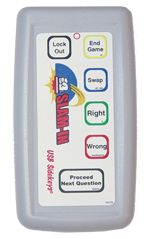 The Slam-In system is available for check out from N01. The system comes in a clear plastic suitcase, which contains:
1 Blue Thumbdrive with the Software
1 USB Cable to connect the Remote Receiver
1 Remote Receiver, about the size of a deck of cards
1 Host Remote, pictured left
10 Slammers, with 9V Batteries reversed
To set up the system:
First, connect the remote receiver to the USB cable, then connect the USB cable to your pc.
Next, insert the thumbdrive and view the files on the drive. Run the Slam In program.
The initial SlamIn window will be your set up screen. Use this setup screen to set your number of teams. Will you have ten teams, or two teams with five members each? You decide how to divide the slammers. Each tab for teams allows you to specify the team name. I usually put the student(s) names as the team name.
I will video how to set it up. And post it next week.
Please review the product's website, http://slammersystems.com
Thursday, April 15, 2010
SmartBoards and Slam-Ins
Yesterday's Master Teacher session in Mrs. Batten's room focused on Smartboard review and expansion, as well as an introduction to Slam-Ins.
I will post a synopsis and study guide on those after I get my gradebook caught up. Thank you to Mrs. Nichols for the cookies!
Next Meeting will be ALL about CPS units. If you have a Thumbdrive and wish to establish your classes and quizzes to be portable (work at home, et cetera) please bring your thumb drive to the class. I will finish the CDs today (Thursday) and send them out.
I will post a synopsis and study guide on those after I get my gradebook caught up. Thank you to Mrs. Nichols for the cookies!
Next Meeting will be ALL about CPS units. If you have a Thumbdrive and wish to establish your classes and quizzes to be portable (work at home, et cetera) please bring your thumb drive to the class. I will finish the CDs today (Thursday) and send them out.
Saturday, April 3, 2010
Why we need to learn technology...
Last week's lesson went great...Although there were challenges with enough pcs and space to get everyone to play with the technology, I think it went very well. I know that learning new things can be hard, and I just wanted to tell you I admire all of your for joining me in this quest for the skills and practice we are building this spring with the classes you are participating in here at CMS. Remember, if you are out of your comfort zone but pushing yourself to learn more--this is what we ask our kids to do. You are never too inexperienced, too old, too busy or too stuck in your ways...teachers love to find new things, and I know you guys can do this even though it may be something that is so totally different from your previous realm of experiences (read "way out of your comfor zone"). You can do it, and I am here to help you start (or continue) on your path. Please, if you find yourself frustrated do not give up...that's what we would ask our kids to do...
Thursday, April 1, 2010
Session 3 Planning
The next training session will be April 14 at 3:15 in Mrs. Batten's room in the East wing. We will start with a review of projector and SmartBoard basics, then move on to SmartBoard Intermediate skills.
Looking for a volunteer to bring refreshments or we can order pizza/breadstix (Mary says she loves these, as do I if I can handle the heartburn).
Looking for a volunteer to bring refreshments or we can order pizza/breadstix (Mary says she loves these, as do I if I can handle the heartburn).
Session 2 Notes: Projector and SmartBoard Basics
Session 2 was held Wednesday, March 30th, at Mrs. Berry's room. Many thanks to Patricia Miller who brought some awesome snacks. We went over projector use and SmartBoard Basics.
Using a projector in class is often a teachers' first step toward tech savy. When you have a projector, you have an inexhaustible buddy..paired with one or two other items and you are well on your way to a tech-savvy approach. It is the second most important piece of equipment in a classroom, after the pc or laptop.

Let's have a look at the back of a typical projector. There are lots of holes to plug lots of things into, and it can be a bit confusing. Two colors are most important: Blue and Gold, yes, like the sausage from the FFA.
Blue ports are generally where the computer monitor port goes--if there are two. Yellow, round single prong plugs are perfect for a camcorder or digital camera, which when combined with a desk lamp give you a home made "elmo" or document camera. And dont forget the power source cable, three-prong typical looking power cord, this is missing from the graphic at left. Sometimes the powercable attaches at the side instead of from the back.
A projector can be used for alot of things, not just death by powerpoint. Just because you have a projector does not mean you should show an endless stream of powerpoint slides or neverending graphics. Mix it up, if you have alot of still photos to share, at least keep the pace upbeat. Make sure your slides are not too wordy, and that you aren't reading it verbatim. Check out this funny video to learn more....
Later!
Using a projector in class is often a teachers' first step toward tech savy. When you have a projector, you have an inexhaustible buddy..paired with one or two other items and you are well on your way to a tech-savvy approach. It is the second most important piece of equipment in a classroom, after the pc or laptop.

Let's have a look at the back of a typical projector. There are lots of holes to plug lots of things into, and it can be a bit confusing. Two colors are most important: Blue and Gold, yes, like the sausage from the FFA.
Blue ports are generally where the computer monitor port goes--if there are two. Yellow, round single prong plugs are perfect for a camcorder or digital camera, which when combined with a desk lamp give you a home made "elmo" or document camera. And dont forget the power source cable, three-prong typical looking power cord, this is missing from the graphic at left. Sometimes the powercable attaches at the side instead of from the back.
A projector can be used for alot of things, not just death by powerpoint. Just because you have a projector does not mean you should show an endless stream of powerpoint slides or neverending graphics. Mix it up, if you have alot of still photos to share, at least keep the pace upbeat. Make sure your slides are not too wordy, and that you aren't reading it verbatim. Check out this funny video to learn more....
Later!
How to use todaysmeet.com
Wow, so cool! I just stumbled upon yet another awesome tool to use in my lab, called todaysmeet.com!!! How exciting... I can create an online chat very easily and simply, and can use this to share links and guide webbrowsing. Check out the video from teachertube.com that I found while browsing for new tools and embedded below.
This is SUPER simple, can't wait to see if the filters block it at school or not. I can see how this would be so useful in guiding the students to links and getting everyone on the same page without having to cut and paste a link to 280 different log ins, plus the kids can then offer feedback about what link they found interesting and discuss the assignment live in the chat room.
How or Where can you use this? Any online activity in the Library, when you have the mobile or stationary labs...or as homework/study groups! Great, huh?
Update:
The school filter's didn't block it...but it was a bit disappointing in the experiment for the first run...within 2 minutes one of the students was harrassing the other students with negative statements and what I call "digital diarrhea" ...just polluting with the same annoying put-down post 20 times, while another student took advantage of my being busy with the new experiment and went to a website I have specifically forbidden. I will revise my plan and try again with more specific guidelines.
This is SUPER simple, can't wait to see if the filters block it at school or not. I can see how this would be so useful in guiding the students to links and getting everyone on the same page without having to cut and paste a link to 280 different log ins, plus the kids can then offer feedback about what link they found interesting and discuss the assignment live in the chat room.
How or Where can you use this? Any online activity in the Library, when you have the mobile or stationary labs...or as homework/study groups! Great, huh?
Update:
The school filter's didn't block it...but it was a bit disappointing in the experiment for the first run...within 2 minutes one of the students was harrassing the other students with negative statements and what I call "digital diarrhea" ...just polluting with the same annoying put-down post 20 times, while another student took advantage of my being busy with the new experiment and went to a website I have specifically forbidden. I will revise my plan and try again with more specific guidelines.
Tuesday, March 30, 2010
Session 2 Resources: SmartNotebook Basics Online Training
Hardware: SmartBoard, Projector, Camera
Software: SmartNotebook 10
From SmartNotebook, Online Training-most videos are two minutes and very to the point.
(Test Post)
Software: SmartNotebook 10
From SmartNotebook, Online Training-most videos are two minutes and very to the point.
Getting Started
A summary of what’s new in SMART Notebook 10. View each tutorial individually, or watch the entire 30-minute overview.
- Tutorial 1: Activation
- Tutorial 2: Finding What You Need
- Tutorial 3: The Ink Layer
- Tutorial 4: Managing Pages
- Tutorial 5: The Properties Tab
- Tutorial 6: The Lesson Activity Toolkit
- Tutorial 7: New Tools in SMART Notebook 10
- Tutorial: What’s New in Notebook 10 – A 30-Minute Overview (Flash file – 113 MB)
Basics
Overview of the Notebook software interface, writing in Notebook software and converting handwriting to typed text.
- Notebook Basics Learning Resource (PDF 1 MB)
- Tutorial: SMART Notebook Software Basics (Flash file - 1.4MB)
- Toolbars - Windows | Mac
- Collecting and Sharing Content - Windows | Mac
- Tutorial: The Notebook Gallery (Flash file - 2.1MB)
- Tutorial: Objects in Notebook Software (Flash file - 2.4MB)
- Working with Gallery Collections -Windows | Mac
- Tutorial: The Page Sorter (Flash file - 2.1MB)
The Lesson Activity Toolkit 2.0
The recently updated Lesson Activity Toolkit is a Gallery collection of customizable tools and templates, including activities, games and graphics, and tools that you can use to create professional-looking, interactive and engaging lessons.
- The Lesson Activity Toolkit (PDF - 251kb)
Lesson Planning and Delivery
Learn how to create lesson material with Notebook software. Add interactive elements to get students involved.
From my training with the Oklahoma State Department of Education, below is a template with the top ten tools. Copy the page into your own presentation and run with it: SmartNotebook 10 Tutorial File including the ten tools for SmartNotebook, opens with the SmartNotebook program. An excellent template/first tool for your SmartToolbox(Test Post)
Subscribe to:
Posts (Atom)